
Use the pre-loaded Google Map on the overview page for overall route illustration >> On each section page, find the pre-loaded Customisable Route for that section via Google Maps. Troubleshoot if the map isn’t loading in its full screen mode, below.
Using Google Maps for Navigation
Note: Our guides are provided as Guide Books primarily. The maps are a supplement to the guide, to illustrate the suggested route, and provide functions via Google Maps, away from the Uncover Britain webpages.
When you are using the maps, you are using Uncover Britain’s pre-populated maps on the Google Maps browser or app pages. Return to the Uncover Britain website to continue using the Guide pages.
Uncover Britain’s pre-populated maps have been created to illustrate point-to-point rather than specific navigational instructions. However, you are able to use Google’s navigational functions to create your preferred route. See below for details on how to do this.
The Uncover Britain’s pre-populated maps are hosted via a non-public map. Please do not share the link beyond your party.
Google Maps are used as the widely accepted as the standard for mapping and navigation. For some features beyond the Uncover Britain webpages, directly on Google Maps, you may be required to have your own account.
Using Google Maps via Browser / Desktop

Click the Navigation arrow as circled to open navigation options
Choose your preferred navigation options:
Starting point
Departure Time
Preferred Route
Send directions to phone

Other Google Maps functions include:
Open in full screen (top right icon) - opens in Google Maps on a new browser
On Google Maps (top right three dots) functions include:
Print map / Download as KML for importing into your navigational devices and opening in Google Earth.
Using the Map Pinpoints alongside the Guide

Most pinpoints link back to the full Guide, since there’s often too much info to fit directly on the map.
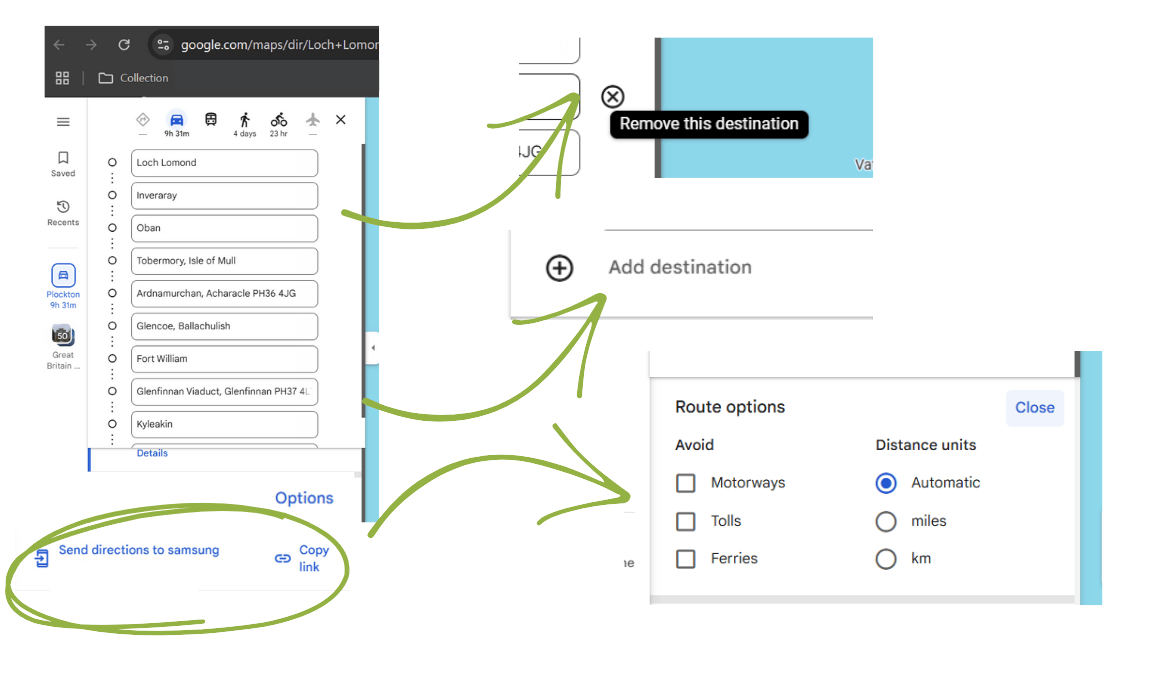
Using the Customisable Route feature via Google Maps - via Desktop / Browser

Using the Customisable Route feature via Google Maps - via Mobile
Editing stops: pre-populated on Google Maps

Getting direction details:


Navigation:

Maps not launching?
The maps open on a new tab in either the Google Maps App or Google, depending on your settings and device. Unfortunately, if the maps are not loading on your device, this is beyond our control - however, this can be addressed by troubleshooting and tweaking your device settings.
Firstly, check by looking at another internet tab or window to see if it has launched. If there is no launched map, please take the troubleshooting steps, including: Uninstalling and reinstalling Google Maps App, re-starting your device, and checking your internet connection is strong enough to launch the Google Maps App.
Please watch the following for different troubleshooting steps covered:
If you are still having issues with your device not launching the maps after the steps outlined, please contact us below with your account details and we will send you the links to access via your browser rather than the Google Maps App. We have had positive customer feedback on the Maps loading on Google Maps APP after following these steps so please take a few minutes to follow these recommendations.
We understand that the issue is with the actual Google Maps App and not when using an internet browser. You should be able to verify this when using a desktop / laptop versus your phone, and open a website browsing page.